
Nimora
Creative studio

AI Product Photoshoot without another disconnected tool.

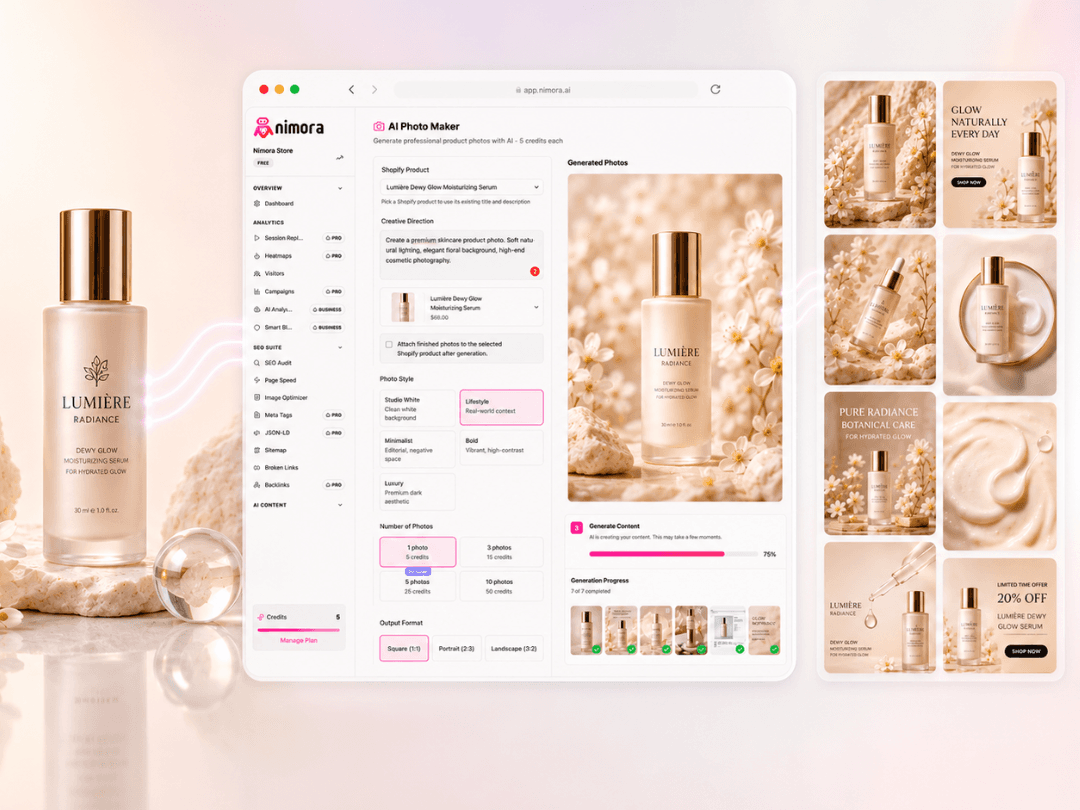
Turn live catalog products into polished studio-style images, lifestyle scenes, and campaign-ready product visuals.

Nimora AI product photoshoot workflow showing generated product visuals

Why it converts

Use product title, description, and existing images as context.

Start from live store context

Review every output before publish

Measure the impact after the change

Sales-ready workflow

Turn ai product photoshoot into a repeatable growth motion.

These sections explain how Nimora connects the workflow to buyer confidence, review control, catalog execution, and measurable store outcomes.

Why this workflow matters

AI Product Photoshoot should be connected to the real store work around it.

Most ecommerce teams do not lose momentum because they lack another dashboard. They lose momentum because the page problem, the shopper behavior, the creative request, and the publishing decision sit in different places. AI Product Photoshoot works better when it is connected to live catalog context, current campaigns, visitor behavior, and the approval step that decides what goes public. Nimora keeps those pieces together so the team can move from signal to action without rebuilding the same evidence across tabs, spreadsheets, and disconnected apps.

The goal is not to create more busywork. The goal is to make the next useful move obvious. When a product page underperforms, Nimora helps the operator see whether the issue is search visibility, missing product context, weak creative, checkout hesitation, campaign mismatch, or a mix of those problems. That context turns ai product photoshoot into a practical operating workflow instead of a one-off task that gets forgotten after the first audit or launch push.

What changes for operators

The page, the product, and the next action stay in the same conversation.

A store team can start with one product, collection, or landing page and follow the evidence from there. If the page is missing search fundamentals, Nimora keeps the fix queue visible. If visitors are hesitating, the replay and heatmap context stay close. If the offer needs stronger product media, the AI studio can work from the same product record. If a campaign is driving poor traffic, the attribution view keeps that decision connected to the page and revenue path.

That matters because ecommerce work is rarely linear. A single revenue leak can involve weak metadata, slow page structure, unclear product imagery, a confusing variant selector, and paid traffic that lands on the wrong promise. Nimora is built for that reality. It gives teams a cleaner way to decide what to fix first, what to review before publishing, and what to measure after the change goes live.

Sales impact

Better execution means fewer lost sessions and clearer reasons to buy.

Shoppers rarely tell a store why they left. They bounce from a product page, pause on a sizing or price question, open a return policy, miss a benefit, or abandon checkout after a confusing step. AI Product Photoshoot becomes more valuable when those small moments are visible beside the work your team can actually ship. Nimora helps turn hidden friction into page improvements, clearer product assets, stronger metadata, and more useful content that supports the buying decision.

That makes the sales story easier to manage. Instead of saying the store needs more traffic, the team can ask sharper questions: which pages deserve cleanup, which products need better visual proof, which campaigns attract buyers who hesitate, and which changes should be reviewed before they reach the live storefront. This keeps growth work practical, measurable, and easier to defend during weekly planning.

Review before publish

Automation should speed up the work without removing control.

Nimora is intentionally built around review. Generated content, SEO updates, product visuals, and workflow recommendations should be visible before they affect a live store. That is especially important for merchants with active catalogs, seasonal launches, paid campaigns, or compliance-sensitive product details. The system can reduce repetitive work, but the merchant should still decide what is accurate, on brand, and ready to publish.

This review-first approach makes ai product photoshoot safer for real operators. Teams can approve a batch, edit the output, skip a change, or use the recommendation as a brief for a teammate. The value is speed with judgment, not blind automation. That is how a store keeps quality high while still moving faster than manual tools allow.

Implementation path

Start with one high-value page, then build a repeatable operating rhythm.

The fastest way to prove Nimora is to pick a page that already matters: a high-traffic product, a launch collection, a campaign landing page, or a page where the team suspects shoppers hesitate. From there, run the workflow, review the signals, make the first improvement, and measure the result. A focused first pass creates a cleaner learning loop than trying to redesign the entire store at once.

Once the team sees the pattern, the workflow can expand into a weekly rhythm. Audit priority pages, review visitor friction, generate missing product media, improve content around buying questions, and keep campaign quality connected to revenue. This is where AI Product Photoshoot becomes part of the store operating system instead of another occasional tool that only gets opened when something breaks.

Buyer confidence

Every fix should make the buying decision easier for a real person.

High-converting ecommerce pages do more than look polished. They answer the questions a shopper has before buying: what is this product, why does it fit my need, can I trust the store, what happens after purchase, and what makes this option better than waiting or comparing elsewhere. Nimora helps connect ai product photoshoot to those questions so the work improves both visibility and confidence.

That is why the best use of Nimora is practical. Use SEO repair to make pages easier to discover and understand. Use visitor insight to see where shoppers slow down. Use AI media to create clearer proof around the product. Use campaign and revenue context to decide whether the improvement is worth repeating. When those workflows support the same customer decision, the store feels easier to buy from.

What the team gets

A cleaner path from store signal to approved action.

Start from live catalog and store context instead of blank prompts.

Review SEO, content, and creative changes before they reach the storefront.

Use visitor behavior to decide which page or campaign deserves attention first.

Connect the completed work back to revenue, traffic quality, and buying hesitation.

Buying questions

Questions teams ask before they connect the workflow.

When should a store use AI Product Photoshoot?

Use AI Product Photoshoot when a page, product, campaign, or catalog area needs clearer execution and the team wants the work tied to real store context. It is especially useful when manual cleanup is too slow, when several tools are creating disconnected tasks, or when the team needs to understand what should happen before the next traffic push.

Does Nimora publish changes automatically?

Nimora is designed around review before publish. The workspace can help generate, group, and prepare work faster, but merchants can inspect the output, approve the right changes, and keep sensitive product or brand decisions under control.

How does this help sales instead of only saving time?

The workflow is tied to the parts of a store that influence buying decisions: product clarity, search visibility, visitor hesitation, creative proof, and campaign quality. Saving time matters, but the larger value is helping the team improve the pages and assets that shoppers actually use before they buy.

What should a team measure after using Nimora?

Track the pages touched, the fixes approved, the visitor behavior before and after the change, campaign quality, and order movement where the data exists. The goal is to learn which fixes deserve repetition, not just to complete a task list.